New TPR Full English ePitaka Extension

There is a new extension that lets you read all of the texts in TPR in both Pāli and English.
You can share this information with your friends.
See video below:
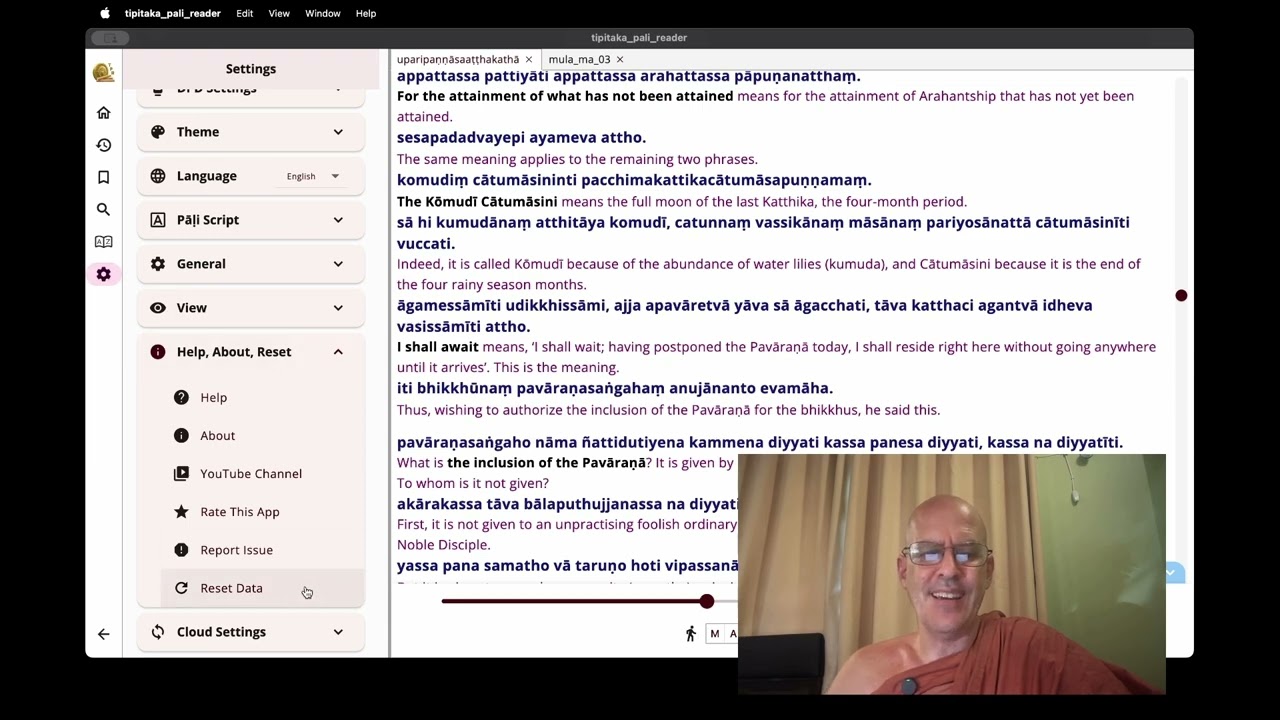
General Transcript:

Announcement: New Version of the Tipitaka Pali Reader (TPR)
Read All of the Commentaries in English

I want to show you the latest update to the Tipitaka Pali Reader, 2.7.7. As many of you know, there is deep interest in Ānāpānassati (mindfulness of breathing). While we have the original Suttas, we also have the ancient Aṭṭhakathā (commentaries) which preserve the Buddha’s detailed instructions.

In the past, practitioners often relied on modern opinions, but the ancient teachers preserved a detailed analysis of the Suttas and practical instructions. Much of this is found in the Visuddhimagga (The Path of Purification), but there are also vital meditation details found within the specific Aṭṭhakathā.

The ePitaka Integration
With the newest version of the Tipitaka Pali Reader, a special extension called ePitaka.org allows you to read the Pāḷi and English line-by-line for any text in the canon.

The Methodology: This was achieved using AI based on the Myanmar Pali Nissaya (a traditional word-by-word, line-by-line translation).

Source: Wikipali.org provided the Myanmar Nissaya data, and ePitaka formatted it for the Tipitaka Pali Reader database.

Accuracy: While it is an AI-assisted translation, it is remarkably effective for study and will continue to be refined over time.

Installation Guide
To get the new features, you must install the extension within the app:

Navigate to Settings > Tools > Extensions.

Wait for the app to load the list from the internet.

Select the Full ePitaka Integration.

How to Access the Commentaries
Once the extension is active, open any Sutta, such as the Ānāpānassati Sutta.

Click the “A” icon to open the Aṭṭhakathā (Commentary).

Scroll to the relevant section (e.g., page 96 or 97).

You will now see the Pāḷi text with the English translation side-by-side.

Backup and Reset Procedures
If you need to perform a fresh install or reset your data:

Warning: Resetting will erase your history and bookmarks.

To Backup: Go to the Bookmarks menu and select Export.

Tip: Always choose a unique file name. There is a known bug where the app appends data to existing files rather than overwriting them.

To Reset: Go to Help > About > Reset Data.

To Restore: After restarting the app, go to Bookmarks and select Import to reload your saved file.

Key Features & Customization
Visuals: You can customize the interface, such as setting the Pāḷi text to blue and the English translation to a bold red tint.

Scripts: The Tipitaka Pali Reader supports various scripts. If you are in Sri Lanka, you can switch the Pāḷi font to Sinhala to read in your native script.

Dictionary Support: Click any word to trigger the dictionary lookup. You can also install English dictionaries for further study.

Platform Support: Currently available on Windows, Android, and Linux, with the iOS and macOS versions arriving on the Apple Store very soon.

Conclusion
This tool allows you to explore the Suttas, Aṭṭhakathā (Commentaries), and Ṭīkā (Sub-commentaries) for yourself. While it does not replace the work of Pāḷi scholars, it provides a powerful way to investigate the Dhamma directly.

May this aid your investigation and practice, leading to a calm mind and the realization of Nibbāna.

Sādhu, Sādhu, Sādhu.

5 Likes

Bhante, how wonderful! Great announcement.

R

1 Like

Respectfully Bhante, while having more options is definitely nice, I don’t understand why the option to use human produced translations has been removed from the software.

It is nice not to have “choices”

As for other poor and biased translations you can see this link below. I have decided that ai was better than “they”.

As for removing being a bad “choice”
I asked ai to give me a list of words.
Even ai played with “Choices”.

Gemini pro (I’d also add astute and prudent)

Here is a list of some of his more debated choices:

  • ​**“Choice” (for** Saṅkhāra ): This is perhaps his most controversial choice. Critics argue that saṅkhāra refers to a complex process of “conditioning” or “mental formations,” whereas “choice” implies a level of free will and conscious deliberation that may not always be present in the original concept.

  • ​**“Mendicant” (for** Bhikkhu ): While technically accurate (a bhikkhu lives on alms), many practitioners feel “mendicant” sounds too much like a medieval European friar and lacks the specific spiritual weight of “monk” or the original “bhikkhu.”

  • ​**“Focus” (for** Samādhi ): Traditionally translated as “concentration” or “immersion,” Sujato often uses “immersion.” However, when simplified to terms like “focus,” critics argue it can sound too much like a mundane productivity tool rather than a profound meditative state.

  • ​**“Rational Application of Mind” (for** Yoniso Manasikāra ): Traditionally “wise attention” or “appropriate attention.” Some feel Sujato’s more “modern” renderings (which vary between “proper attention” and “rational application”) can strip away the organic, “to the source” (yoni) flavor of the original term.

  • ​**“Breeding” (for** Methuna ): In certain contexts (like the Aggañña Sutta), he translates methuna—usually “sexual intercourse”—as “breeding” or “sex life.” Some critics argue this can lead to confusion, as seen in online debates where readers mistook his usage of “breeding” for animal husbandry rather than human sexual activity.

Yes, and in addition to the other issues you have pointed out with this term, English terms like this could eventually lead English-speaking monastic communities to think some of the monks should live like friars, and it might lead to a situation like this one:

R

1 Like

I see choices have been made and there is nothing left to discuss.

Wish you well, Bhante,

Julien

1 Like

the link with all downloads.

1 Like

Thank you, Bhante. As a native Vietnamese speaker, I find the Vietnamese AI translation to be remarkably good—often as good as, or even better than, a human translator in certain cases.
Unlike English, there is a noticeable difference between contemporary Vietnamese and literary Buddhist Vietnamese. If one were to use contemporary language to translate the Suttas, the result would often feel unnatural or even unintelligible (modern Vietnamese phrasing would make Sutta translations feel extremely ‘off’). However, the AI has handled this very well, using proper Buddhist terminology and also avoiding overly contemporary language.
The translation is easy to read and feels natural to a literate Buddhist reader. While there are still some inconsistencies that need improvement, I believe the biggest obstacle is simply the prejudice people have against AI translations, the bias against AI-generated content, but I believe the results will eventually prove the skeptics wrong. Over time I think the quality will speak for itself. Thank you again Bhante for your great work.

2 Likes

dear Venerable Ñāṇa,
Thank you for the post which I fully agree with.
It is thanks to Venerable Subhuti encouragement (off list) that I have taken up different AI models and been increasingly impressed with their translations. I mostly use ChatGPT - latest model and Gemini Pro currently. But I am suspect Grok will be a contender in the near future. Here is a comment by Bhikkhu Bodhi about translating the Paṭisambhidamagga and commentary from over a year ago (now the results are more impressive).

https://groups.io/g/dsg/message/179233
Bhikkhu Bodhi: The results are amazing and each work only takes about 15 minutes to translate and is of high quality.

The job of a translator is becoming more of a final authority who looks at various AI model translations, and compares with the Pali words and context for clarity and tweaking. He can use the Canon translation in say Thai as well and translate those to English with Ai as another check.

2 Likes